Table of contents
- What is understood by an SSL and an SSL certificate?
- How does SSL encryption work?
- What do you need an SSL certificate for?
- HTTPS and SEO: The advantages of SSL encryption
- project. This is a protocol for transmitting content over the internet, specifically developed for low latency. In response, the HTTP/2 security protocol was standardized in March 2015. HTTP/2 ensures that websites load faster by streamlining communication between the browser and the server. Although HTTP websites can also use HTTP/2, the protocol is primarily intended for HTTPS pages. This is also the main reason why HTTPS websites are faster than those using HTTP.
Surely you have visited a website and have been alerted by Google that it is not secure. The search engine issues this type of warning for websites that do not use SSL. This encryption-based security protocol ensures that hackers cannot access the data that you enter on websites. In this article, you will delve into the world of SSL and HTTPS and find out how they can affect your SEO.
Recommended SEO Tools
You can find more recommended tools SEO-Tools on OMR Reviews and compare them. In total, we have listed over 150 SEO tools (as of December 2023) that can help you increase your organic traffic in the long term. So take a look and compare the software with the help of the verified user reviews:
What is understood by an SSL and an SSL certificate?
SSL stands for Secure Sockets Layer, a security protocol that establishes an encrypted connection between a web server and a web browser. This ensures the security of internet connections. It prevents criminals from reading or changing the information transmitted between two systems. A website that uses SSL has an SSL certificate. This is a digital certificate that verifies the identity of a website and enables an encrypted connection. The SSL certificate contains the following information:
- The domain name for which the certificate was issued
- For which person, organization or device it was issued
- Which certification authority issued it
- The digital signature of the certification authority
- Associated subdomains
- Issue date and expiration date of the certificate
- The public key (the private key is not displayed)
A website secured by an SSL certificate includes the acronym HTTPS (stands for HyperText Transfer Protocol Secure) in its URL. If there is no SSL certificate, only the letters HTTP (without the S for Secure) are displayed. Also, a padlock symbol is displayed in the URL address bar of an SSL-secured website. This signals to the users that the website is safe and trustworthy.
Note: The term SSL is often used synonymously with TLS (Transport Layer Security). Like SSL, TLS is a security protocol that encrypts data and secures the internet connection. It is a newer version of SSL and fixes some security vulnerabilities in the earlier SSL protocols. TLS is today's encryption standard, as almost all SSL versions are now obsolete. Even Google has not been using SSL protocols since 2014.
How does SSL encryption work?
SSL ensures that all data transferred between users and websites remains unreadable. To this end, the security protocol uses encryption algorithms to prevent hackers from accessing the data during transmission. These data include potentially sensitive information such as names, addresses, credit card numbers or other financial details.
Below is a step-by-step explanation of how SSL encryption works:
- A browser or server attempts to connect to a website secured by SSL.
- The browser or server requests that the website identify itself.
- The website then sends the browser or server a copy of its SSL certificate.
- The browser or server checks whether it trusts the SSL certificate. If so, it informs the website.
- The website then sends a digitally signed acknowledgement back to start an SSL-encrypted session.
- The encrypted data is exchanged between the browser or server and the website.
This process is sometimes referred to as the "SSL handshake". What sounds like a lengthy process, however, takes place within milliseconds.
What do you need an SSL certificate for?
The SSL certificate is not just a "nice to have". It is an essential ingredient of a successful company website. It becomes even more important when you run an e-commerce website and process personal data from your customers. But gaining your visitors' trust and improving the User Experience is not the only reason why you should use SSL encryption. Below, you will find the main benefits of an SSL certificate and the activation of HTTPS on your website:
Security and Privacy
The SSL certificate protects your server from hackers posing as users' web browsers. It not only prevents cybercriminals from crashing your website or injecting malicious codes or viruses. It also guarantees the privacy and security of your website visitors. Because the last thing you (as webmasters) want is for visitors to have confidential information stolen from your website. This is damaging to your reputation and could lead to penalties or lawsuits if user security is compromised or misused.
To protect your website visitors, you must therefore set up an SSL certificate and use HTTPS. This is not only necessary for companies that collect sensitive information such as credit card data. It is also a must if you store user information such as medical data on your website.
Trust
In the age of viruses, malware and phishing, more and more users are concerned about the security of their data. In fact, already
85% of online shoppers avoid insecure websites. Google also labels insecure internet pages that do not use HTTPS.

Security Warning
Although this warning does not necessarily mean that there is a problem with the website, it is intended to deter users from disclosing sensitive information. Just like Google Chrome, Safari and Firefox also issue similar warning messages. These negatively affect the trust of your website visitors.
Lead generation and conversions
If you do not use HTTPS, users will hesitate to visit your website. Even if they do access your website, they are likely not to fill out any
lead generation forms. They will hesitate even if they only have to provide very simple information such as their email addresses. To avoid this, you need an SSL certificate. With HTTPS in your URL and a security lock symbol in the address bar, your website visitors feel safer. This in turn increases the number of leads, the
conversion rate and of course the turnover.
HTTPS and SEO: The advantages of SSL encryption
Switching from HTTP to HTTPS will not catapult you to the first page of the SERP immediately. To achieve this, you need to implement a complete strategy, including
on-page optimization,
link building and the creation of
SEO content. Nevertheless, using SSL encryption offers a number of advantages to advance your SEO:
HTTPS as a ranking factor
In 2014, Google demonstrated its commitment to a secure internet by adopting HTTPS as a ranking factor for its search engine. This means that the Google algorithm always prefers those of two equivalent websites that work with HTTPS or SSL certificates.
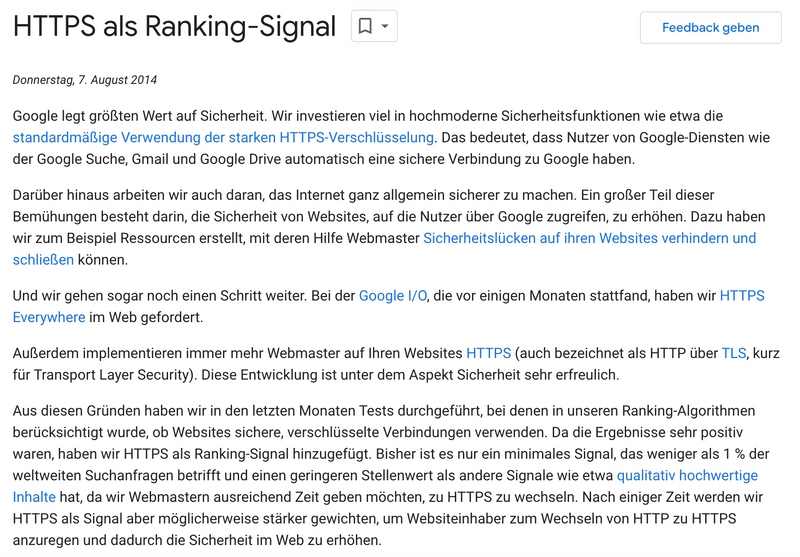
HTTPS as a ranking factor
page rank
HTTPS activation on your website is the first step.
Longer dwell time
Dwell time is the time users spend on your website before returning to the SERPs. It gives Google information about how accurate your website was for a specific search query. The rule of thumb is: the longer the dwell time, the more relevant your content is and the higher your website will rank in the SERPs.
Not using HTTPS can have a negative impact on dwell time. No matter how high-quality your content may be, if visitors are confronted with the "Not Secure" warning, they will not view your content. Instead, they will return to the SERPs, decreasing the dwell time. As a result, the Google algorithm deems your website irrelevant for the respective search term, lowering your ranking.
Faster loading timesIn 2012, Google announced the
SPeeDY (SPDY)
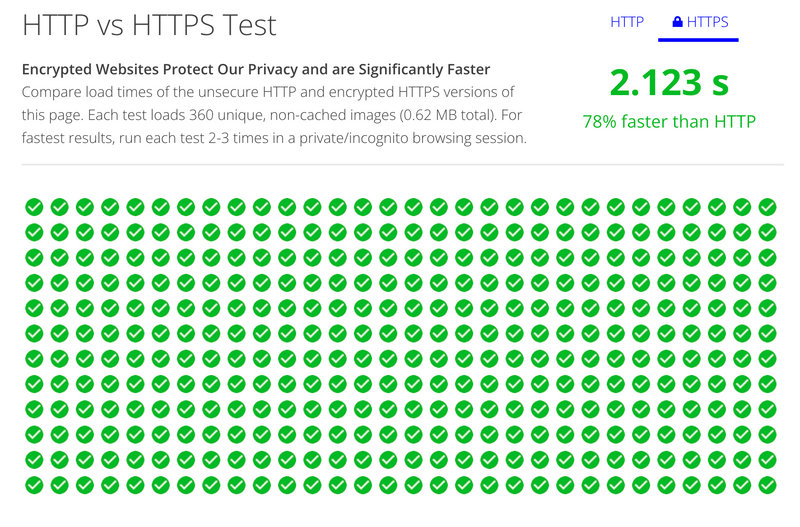
project. This is a protocol for transmitting content over the internet, specifically developed for low latency. In response, the HTTP/2 security protocol was standardized in March 2015. HTTP/2 ensures that websites load faster by streamlining communication between the browser and the server. Although HTTP websites can also use HTTP/2, the protocol is primarily intended for HTTPS pages. This is also the main reason why HTTPS websites are faster than those using HTTP.
HTTP vs HTTPS Test: faster loading times
website security software
can also assist your website. We have compiled a few tools for you.


 Seobility
 Sistrix
 Screaming Frog SEO Spider
 Google Search Console
 Ahrefs
 WP Ghost by AISQ
 Pentest Website Scanner
 Intruder
 Sucuri
 Datadog


