Table of contents
- What needs to be checked, and what requirements apply under WCAG and BITV?
- Which tools are suitable for a website accessibility check?
- What does a website test for digital barriers achieve?
- After the accessibility test: Which issues should I fix first?
- Typical accessibility errors and how to fix them
- Conclusion: Don’t stop at the accessibility score
Key points at a glance
- An automated scan quickly shows you where the problems lie. For a comprehensive accessibility assessment, you’ll also need to carry out manual usability tests.
- Since 28 June 2025, the BFSG has also applied to certain products and services provided by private companies; public bodies are additionally guided by the BITV 2.0.
- Which tool is suitable depends on its role in the testing process, ranging from individual checks using WAVE, axe DevTools or Lighthouse to scalable solutions for audits and monitoring.
- When prioritising issues, blockers in core processes such as navigation, forms or checkout should be addressed first, followed by systemic errors that can be centrally fixed in one place.
- Typical errors such as missing alt text, poor keyboard accessibility or insufficient contrast can often be rectified directly within the design system or in core components.
Anyone tasked with testing websites for accessibility usually faces a practical question quite quickly: is an automated scan sufficient, or is a full manual audit necessary? I find a scan-based tool very helpful for an initial overview. However, an automated check alone is not sufficient for a comprehensive assessment. I therefore recommend combining automated assessments with manual usability tests and, building on this, prioritising the barriers identified.
“I do not view an accessibility test as a one-off tick on a compliance checklist. For me, it is a quality process that links design, development, editorial work and ongoing quality assurance.” – Eckhard Schneider, Founder and CEO, decareto
From a legal perspective, the issue has become increasingly important. Since 28 June 2025, the
Accessibility Enhancement Act (BFSG) has been in force, transposing the European Accessibility Act (EAA) into national law and providing for fines in the event of breaches. Since that date, legal accessibility requirements have also applied to certain products and services in the private sector. These include, under certain conditions, services provided via e-commerce. For public bodies, the Accessible Information Technology Regulation (BITV 2.0) also plays a key role.
What needs to be checked, and what requirements apply under WCAG and BITV?
Before I start an accessibility test for a website, I first clarify the assessment criteria. In doing so, I come across two terms in particular: WCAG and BITV.
The Web Content Accessibility Guidelines (WCAG) are international guidelines for accessible web content. WCAG 2.2 was published in 2023 as a W3C Recommendation.
Digital accessibility is based on four fundamental principles. Content must be designed to be perceivable, operable, understandable and robust.
What may sound rather abstract at first becomes much clearer with examples:
- Insufficient colour contrast affects perceivability.
- A menu that cannot be opened using the keyboard affects operability.
- A poorly labelled form can impair comprehensibility.
- Incorrect semantic markup can impair robustness across browsers and assistive technologies.
Assistive technologies refer to tools that enable people with disabilities to use digital services. These include, for example, screen readers that read out screen content or output it via a Braille display.
When is a BITV audit advisable?
For public institutions that require a formal conformity assessment and must produce a declaration of accessibility, BITV 2.0 is the applicable standard. Experience shows that such an audit involves a significant amount of work and costs in the four-figure range.
When is a WCAG test advisable?
For certain products and services offered by private companies – for example, in online retail or consumer banking services – the requirements of the BFSG apply instead. A professional audit helps to systematically check and document compliance with the relevant accessibility requirements.
A regular WCAG test helps to identify problems at an early stage and bring the website up to accessibility standards before legal risks arise.
BIK BITV Test: The Professional Audit
BIK BITV stands for ‘Accessible Information and Communication – Accessible Information Technology Regulation’. A BIK BITV (web) test differs significantly from a quick automated scan. For large-scale websites, representative pages and processes are selected. According to the procedure description, the current BIK BITV test (web) comprises 98 test steps, in which 88 accessibility requirements for web content are assessed. It is based on EN 301 549, which includes, amongst other things, the requirements of WCAG 2.1. Organisations requiring official confirmation of compliance can commission an audit in accordance with the BITV audit procedure, carried out by members of the BITV Test Audit Network.
A quick search online reveals a wide range of tools for accessibility testing. Whether you’re looking for an accessibility checker to get a quick initial overview or a tool for professional accessibility audits, you’ll be spoilt for choice.
I wouldn’t therefore start by asking: Which tool is the best? For me, the more important question is: What task should the tool perform?
Which tool is appropriate depends on the tasks it is intended to perform during the testing process: test → prioritise → fix → re-test → monitor
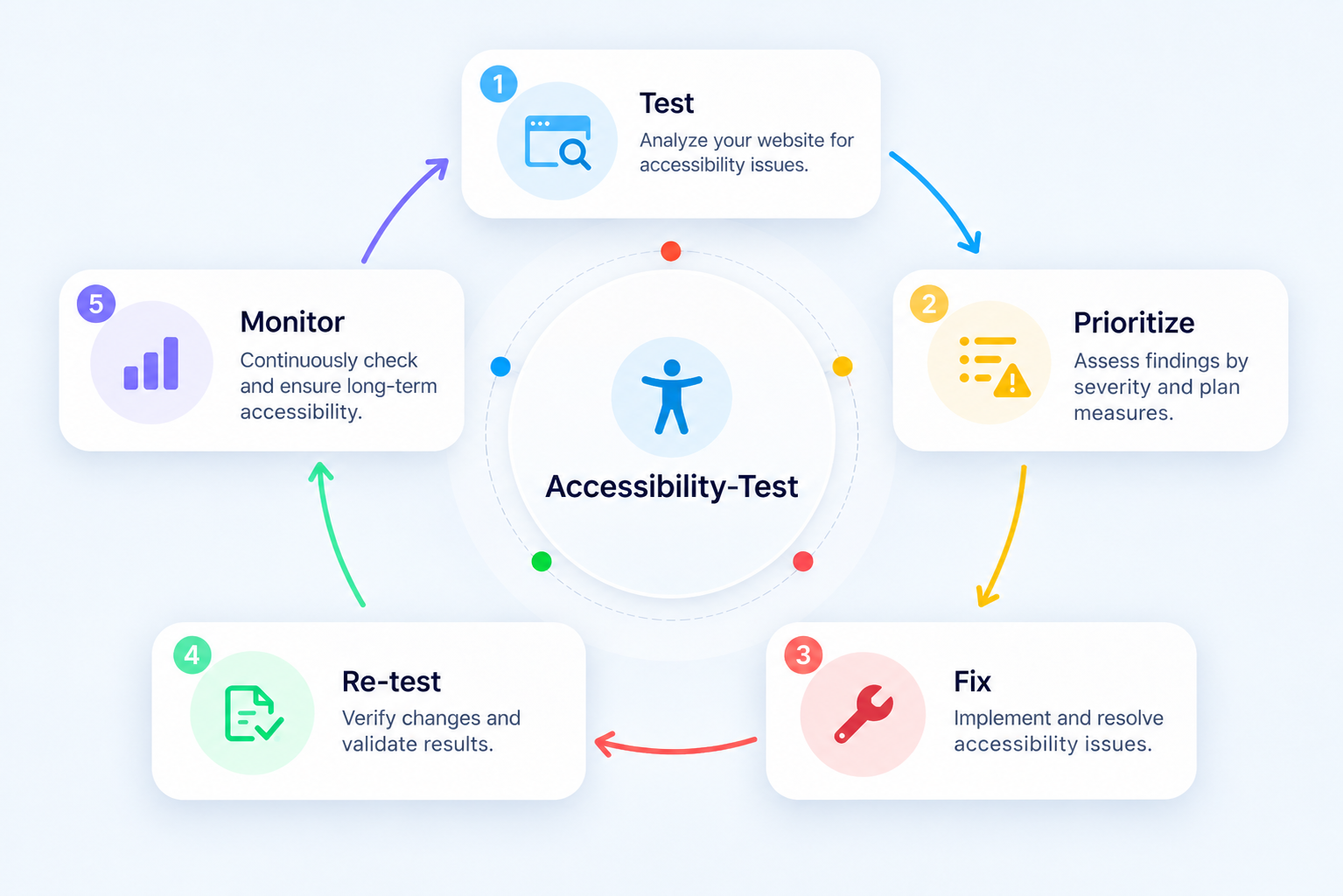
website test
For a quick test or individual check, tools such as
WAVE,
Axe Dev Tools (Chrome extension) or
Lighthouse are suitable. These allow typical technical issues on individual pages to be highlighted directly within the browser. The tools also provide guidance on how to rectify findings, but they are no substitute for a comprehensive accessibility assessment.
For larger websites, scalability plays a more important role. For automated solutions, it is worth taking a look at the OMR category
Digital Accessibility Tools. Amongst others, you will find
decareto.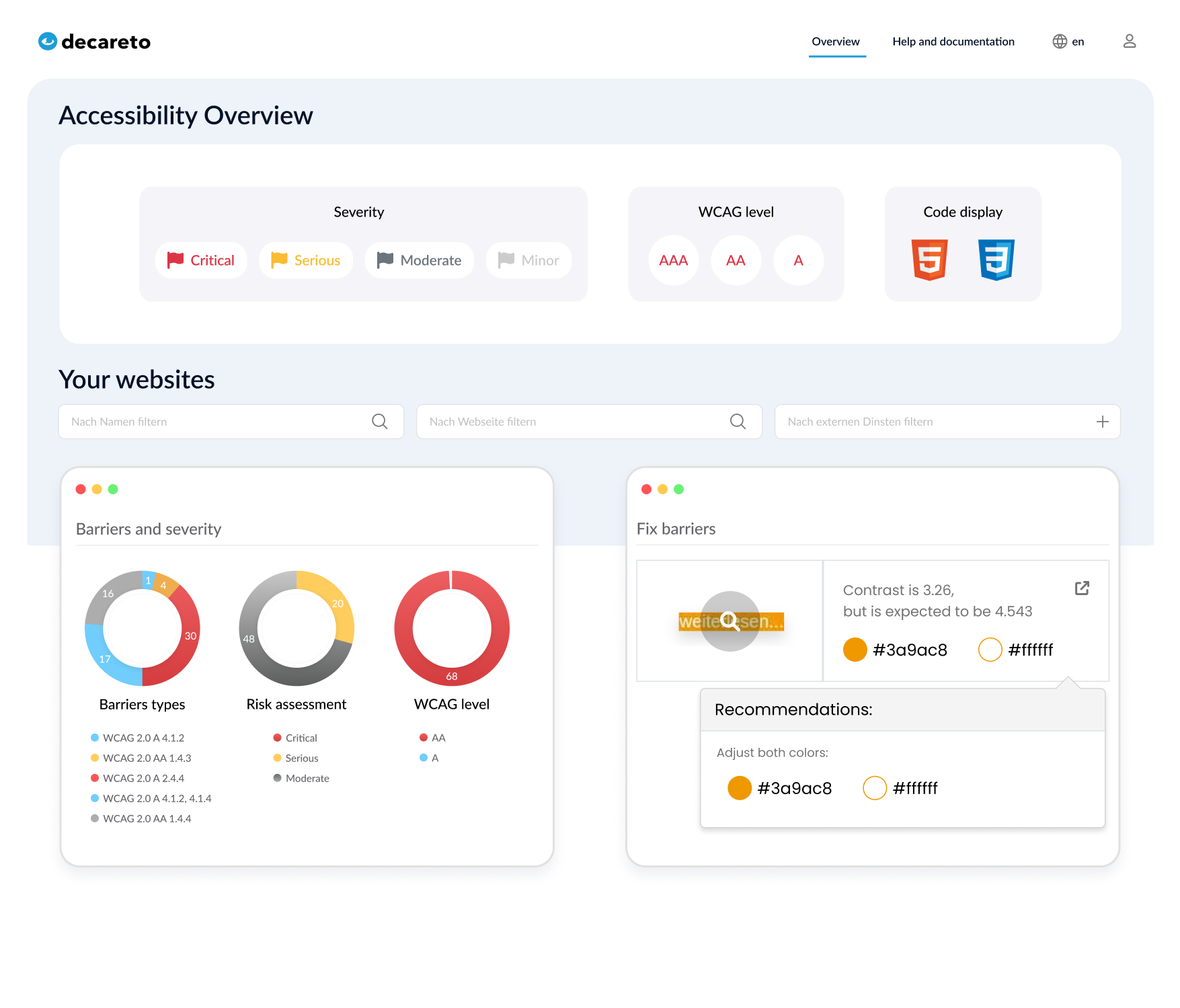
decareto test tool
If accessibility is to be monitored continuously in order to keep track of a page’s current status when changes are made,
website monitoring tools such as decareto are also worth considering.
Checking for accessibility with professional white-label software – who stands to benefit
White-label solutions are particularly useful when agencies or service providers need to check a large number of pages for accessibility and wish to systematically record and document any issues found. The advantage lies in being able to create audit reports in your own design and hand them over to clients.
Agencies and service providers
An accessibility check can be offered as part of a service portfolio and helps to attract new clients and retain existing ones. Clear reporting is key here, as it helps to communicate the test results in a comprehensible and structured manner to different specialist departments. This enables barriers to be resolved by development, UX/design teams or marketing.
What does a website test for digital barriers achieve?
The annual WebAIM Million Report for 2026 illustrates just how widespread technical accessibility issues are: automatically detectable WCAG errors were found on 95.9 per cent of the one million homepages examined. The most common errors included low text contrast, missing alternative text, form fields without labels, and empty links and buttons.
For me, a good accessibility test must answer three questions:
- What technical, visual, content-related and interactive issues exist?
- What actual barriers do these create in a real-world usage context?
- Which issues should be addressed first?
We start with a software-based scan: automated tools primarily detect technical issues. These include, for example, the errors identified in the WebAIM Million Report. Particularly valuable here is the consistently identical testing process, which also allows us to check what has improved following corrections.
I would like to emphasise here that, from a technical perspective, a website can produce a good scan result and still contain barriers. For example, a button with unclear labelling may be focusable, and a correctly marked-up form may still contain an incomprehensible error message.
Manual testing then takes over in the context of actual use
A good accessibility test combines scan-based analysis with manual testing to identify actual barriers as experienced by users. This is because automated testing only detects up to half of all barriers.
Reviewing findings and assessing digital barriers
The results from automated and manual tests must then be assessed. In doing so, I check which findings actually constitute a barrier, how they affect usability, and whether the proposed recommendations for action are applicable.
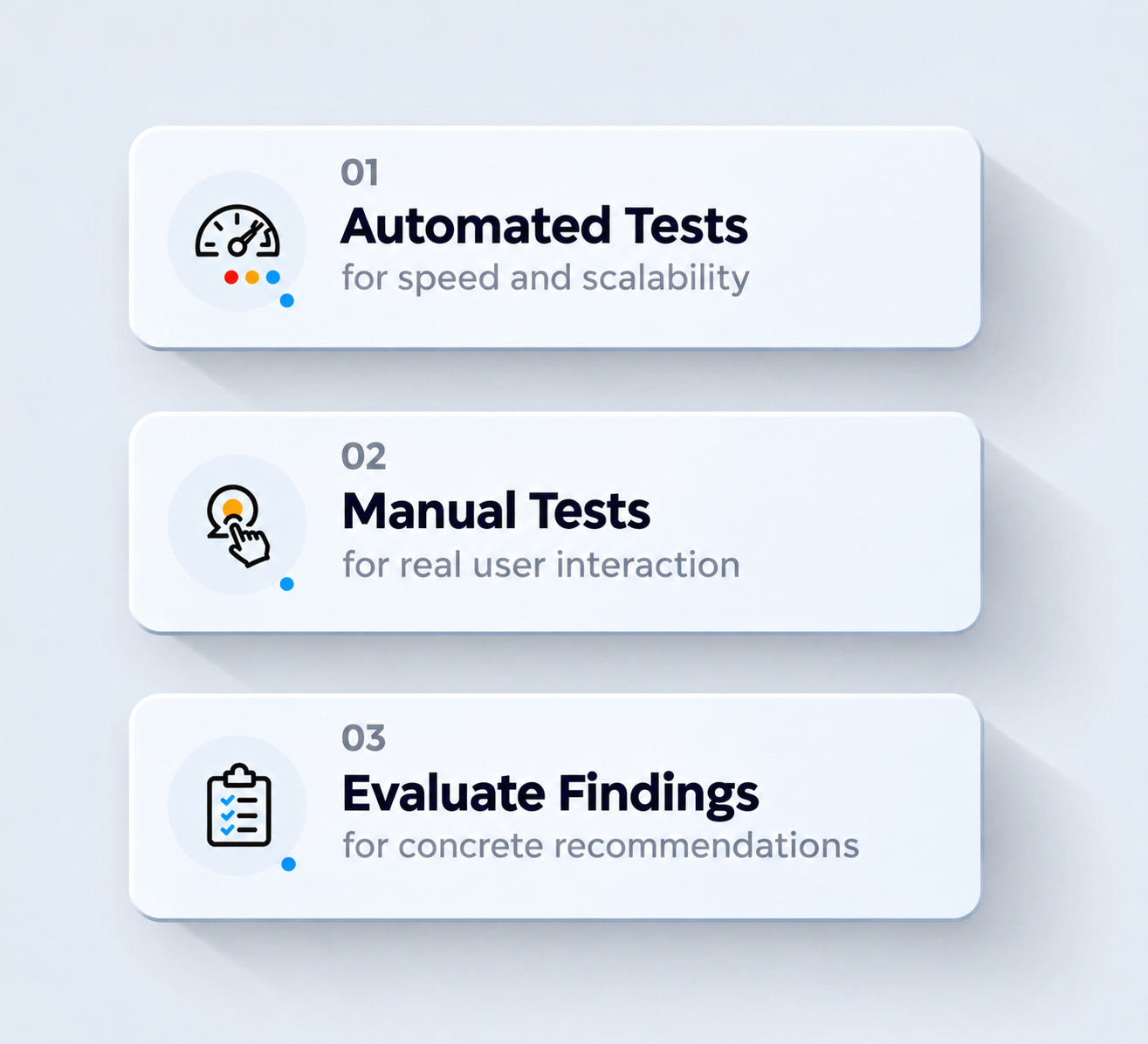
accessibility test: three steps
After the accessibility test: Which issues should I fix first?
After an extensive test, dozens or even hundreds of findings can quickly accumulate. Professional tools help to systematically record these and categorise them according to WCAG requirements. This quickly reveals which problems occur particularly frequently and where action is needed. Prioritising the implementation determines whether a website improves.
For me, four questions are crucial for prioritisation:
- Does the problem block an important process?
- How severe is the barrier for those affected?
- How frequently does the problem occur?
- Can I resolve the root cause centrally?
Blockers such as inoperable navigation, an inaccessible checkout process or a form that cannot be submitted without a mouse are given high priority. Equally important are systemic errors that can be resolved on many pages simultaneously through a central fix. I assign a lower priority to isolated, individual issues. I also document responsibilities. Technical issues, for example, are referred to the development or UX teams, whilst editorial issues go to the content teams.
Typical accessibility errors and how to fix them
Accessibility tests reveal common and recurring problems relating to usability, comprehensibility and the presentation of content. Areas that are crucial to the website’s core functions or that are frequently used are particularly important. These include various types of pages, templates, components and processes such as registration, booking, checkout or login.
It is also important to identify the technical cause of a problem. If, for example, the issue lies in a central component or the design system, a single fix can improve several pages at once.
- Missing alt text and incorrect ARIA labels:
Images that support the content require appropriate alternative text so that the information they convey is also accessible via assistive technologies. ARIA stands for ‘Accessible Rich Internet Applications’. This refers to additional technical information that can be used, for example, to describe the roles or states of complex user controls for assistive technologies. - Keyboard navigation is faulty or cumbersome: For example, I check whether key functions can be operated entirely without a mouse. I examine menus, modals and individual control elements particularly carefully. It becomes a critical issue when functions are completely inaccessible or the keyboard focus is lost.
- Incorrect semantic markup: Here, I check whether content can be meaningfully accessed using assistive technologies such as screen readers. When using a screen reader, elements such as headings, landmarks, links, buttons, images, forms and tables play a key role. It is crucial that structure, names, roles and content are conveyed clearly.
- Layout breaks when zoomed in significantly: Another area of testing is how the content is displayed when zoomed in and on smaller screens. Even when zoomed in to 200 per cent, in small viewports and with reflowed text, content must remain fully usable. Text and functions must not be cut off, overlapped or rendered inaccessible.
- Insufficient contrast: Text, colours and states can often be corrected centrally within the design system or CSS – in some cases across hundreds of pages simultaneously.
- Missing form labels: Placeholders are no substitute for correctly linked labels. Such errors are particularly critical in contact forms, registration processes and checkouts.
- Illogical headings: A visually large font does not, technically speaking, constitute a heading. I therefore ensure semantic HTML and a clear hierarchy.
- Unclear links: Descriptive link text makes navigation easier whilst also explaining the link’s destination.
- Non-accessible downloads: Documents provided on the site must also be checked. You can find further information on this in the article about accessible documents.
My practical tip:
How can the keyboard usability of websites be systematically improved?
For me, the keyboard is one of the most effective low-tech testing tools. If I can only complete an important process using the mouse, I’ve found a real barrier – regardless of how good the automated scan looks. Across 25 pages, ‘Implementing Keyboard Accessibility Correctly – A 10-Point Guide to Accessible Websites’ sets out what really matters in practice – with specific checkpoints, common mistakes and tips you can put into action straight away.
Conclusion: Don’t stop at the accessibility score
For me, testing a website for accessibility means much more than simply running a checker. Accessibility is not a purely technical task. Rather, it requires a holistic approach and encompasses design systems, development, content processes, quality assurance and – depending on the service – legal requirements.
An accessibility tool can show me where I should take a closer look. However, it cannot reliably tell me whether a person can actually complete a purchase, understand a form or use the navigation.
Yet that is precisely how I would measure the quality of an accessible website.
 decareto


