Table of contents
- What is an AI design system?
- Why do ad hoc AI tools hurt brand consistency?
- Where does AI fit in the design workflow?
- Which tasks should stay with human designers?
- How do review gates keep AI output on brand?
- How do you connect AI output to your design system?
- How do you pilot and scale AI in a design team?
- How do you know the workflow is working?
Key takeaways
- Integrate AI with your design system before attempting to scale its usage.
- Structure your workflow carefully by implementing five distinct phases and four review gates.
- Delegate drafting, assembling, and checking to AI, while humans retain control over direction, risk, and system changes.
- Pilot the process with a single team and product flow to accurately measure results against a baseline.
An AI design system is a design system that AI tools can read and follow. Its tokens, components, rules, and documentation are structured for machines, while people stay responsible for what gets approved. A human-in-the-loop design workflow is the process around it. AI drafts and checks work in defined phases, and named people approve the result at fixed review gates.
This article is about that structured workflow, not about tools that simply generate images, even though many people mix up the two. I'll show where AI fits, where human judgment stays essential, and how to pilot the model with your team.
What is an AI design system?
An AI design system gives AI tools access to the same approved decisions your team uses. It builds on a traditional design system, the shared set of reusable components, standards, and guidance behind a product or brand. The difference is that its rules are written down in a structured, machine-readable form, instead of living in team memory or prose docs.
Three building blocks matter most:
- Design tokens: Named design decisions for values such as color, typography, and spacing. The Design Tokens specification reached its first stable version in October 2025. The specification gives tools a vendor-neutral exchange format.
- Component library: Approved, reusable interface parts, including their states and variants.
- Machine-readable metadata: Structured information that tells software what a token or component is for, when to use it, and whether it's still current.
An AI-ready design system has these foundations in place. As Design Systems Surf puts it, the system's logic has to be explicit, because AI can't draw on a team's shared experience. An agentic design system goes a step further. Here, AI agents can read the system and act inside it. Agents are AI tools that plan and carry out multi-step tasks. I treat this as a later maturity stage, not a starting point.
Ad hoc AI tools hurt brand consistency because they work outside the rules that define your brand. A one-off prompt can't see your approved components or the reasons behind them, so the tool fills the gaps with guesses.
The public data points in the same direction. In zeroheight's State of AI in Design Systems 2026, 82% of 123 practitioners said their teams use AI in some form. Half said AI use elsewhere in the organization is creating problems. 59% reported user interfaces that bypass the design system. The respondents were mostly in-house product design leaders at mid-to-large technology companies, so this is a focused sample rather than a market average.
Generation alone doesn't solve the problem. In Adobe's 2026 Creators' Toolkit Report, 57% of more than 16,000 surveyed creators said their AI output typically needs moderate or extensive editing before it's ready to share. These were social-first creators rather than in-house designers, but the gap between a fast draft and approved work will sound familiar.
This is also where generative AI design and an AI design system part ways.
AI image generators are useful for moodboards and early concepts. An image alone, however, carries no tokens, component states, or usage rules.
On OMR Reviews, the managing director of regulaid describes using
innoGPT to replace a tangle of separate AI tools with one platform and shared standards. I think that's the right instinct, but
one platform only solves part of the problem. The output still has to connect to your brand and your design system.
Where does AI fit in the design workflow?
AI can support every phase of the design workflow, but its job changes along the way. It drafts early on, assembles from approved parts in the middle, and checks work near the end. I recommend this five-phase AI design workflow with four review gates:
Phase | What AI does | What people decide | Review gate |
|---|
1. Frame | Summarizes research, drafts the brief, lists constraints | The problem, audience, and success measure | Gate 1: Brief approved |
2. Explore | Generates variations and alternatives | Which direction fits the strategy and brand | Gate 2: Direction approved |
3. Build | Assembles layouts from approved tokens and components | How to solve edge cases and whether a new pattern is needed | Gate 3: System compliance |
4. Verify | Flags token misuse, contrast issues, missing states, and off-brand copy | Whether the work is usable, accessible, and ready for release | Gate 4: Release approved |
5. Hand off and learn | Drafts documentation and change notes, flags drift | What enters the design system | Feedback into the system |
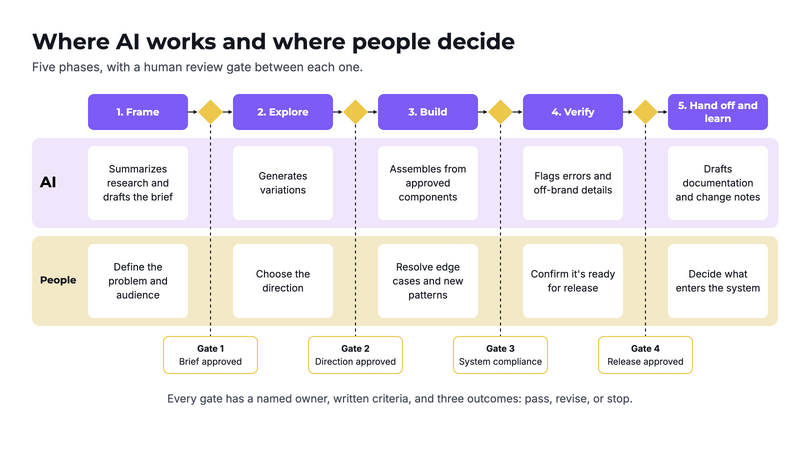
The five-phase workflow with four review gates (see the infographic 01).
Documentation is a sensible place to start. In zeroheight's survey, documentation was the use case respondents were most satisfied with (63%). Design generation was the biggest miss, with a net satisfaction score of −53. That's why AI for designers should begin with bounded, reviewable tasks, not with whole screens.
Which tasks should stay with human designers?
Human designers should keep every decision that requires accountability, context, or taste. AI in design can widen your options, but it can't own the consequences of choosing one. Five areas stay with people in my model:
- Problem framing: Deciding what the team should solve and why.
- Brand direction: Judging whether work feels like your brand, not merely whether it follows the rules.
- Research interpretation: Deciding what user evidence means for the product.
- Final sign-off: Accepting responsibility for accessibility, legal, and brand risks.
- System changes: Approving new tokens, components, and patterns.
The last point is my clearest line: AI should never approve its own work or change the design system independently. It can propose a change, but a named person decides.
Practitioners and creators are cautious here too. In zeroheight's survey, 67% called AI somewhat or way overhyped, and output quality was the top concern. In Adobe's survey, 85% said the final creative decision should always remain with the creator, and 81% said human judgment remains essential to creative taste.
How do review gates keep AI output on brand?
Review gates keep AI output on brand by checking it against explicit criteria before it moves on. A design review only becomes a gate when it has a named owner, written pass criteria, and three possible outcomes: pass, revise, or stop.
- Gate 1, brief approved: The design lead and product owner confirm the problem, audience, and constraints.
- Gate 2, direction approved: The design or brand lead checks strategic fit and distinctiveness.
- Gate 3, system compliance: The design system owner checks tokens, components, states, and any exceptions.
- Gate 4, release approved: An accountable lead confirms usability, accessibility, brand fit, and any required legal review.
The depth of each gate should match the risk. A social media variation may need a five-minute check, while a new checkout flow needs a full review. I wouldn't remove Gate 4 for anything that reaches customers.
Gates also build trust. Adobe asked creators what would make them comfortable giving agents more independence. 44% wanted to review, edit, or undo at any point. 37% wanted transparency into what the agent does and why.
A simple version of this already appears on OMR Reviews. A marketing manager at Agicap builds creatives in
Figma, where the brand guidelines are stored. When in doubt, the brand team approves them. The AI layer is new, but the principle is the same: rules first, then a human decision.
How do you connect AI output to your design system?
You connect AI output to your design system by giving tools direct access to your source of truth, then checking the result against it. Screenshots and long prompts are weak substitutes for structured access.
- Align your names: Use the same logic for tokens and components in design and code.
- Add metadata: Record each item's purpose, status, allowed variants, and accessibility rules.
- Connect your tools: The Model Context Protocol (MCP) is a standard interface that lets AI agents interact with data sources. The Figma MCP server passes design context to agents and can write native content back to the canvas. Figma's Code Connect helps generated code reuse your actual components.
- Assign ownership: Design system governance defines who can approve, change, or retire each part of the system.
Access isn't the same as understanding. In zeroheight's survey, 48% already run an MCP server, but only 17% rate their documentation as "very AI-ready." I'd fix the documentation first.
Your stack of
AI design tools will probably cover more than interfaces, so each tool needs the same brand rules. Check the current features of each option, and read reviews from teams with similar needs:
Tool | Role in the workflow | On OMR Reviews (November 2026) |
|---|
| Design, components, Figma AI tools, and MCP context | 4.6 from 178 reviews; users praise collaboration but report slowdowns with large files |
| AI video automation with a brand kit | 4.8 from 51 reviews; users cite templates, but note limited flexibility for detail changes |
| On-brand text and images through its Brand Hub | [Rating] from 932 reviews; [Nutzer-Insight ergänzen] |
| Central access to multiple AI models, with a focus on General Data Protection Regulation (GDPR) compliance | 4.8 from 56 reviews; users note that some answers still need checking |
| Marketing text, images, video, and brand voice | 5.0 from 4 reviews, which is still a small sample |
How do you pilot and scale AI in a design team?
Pilot AI with one team, one product flow, and one component family, then scale only what passes your measures. A 10-week pilot is my suggested starting point. Long enough to run real work, it's still short enough to change course.
- Audit (weeks 1–2): Choose the flow, component family, and documentation page. Ask where AI would have to guess, then close the most important gaps.
- Set the rules (weeks 2–3): Define approved tools, data rules, gate owners, and pass criteria. Record a baseline from comparable work.
- Run the pilot (weeks 4–9): Use the workflow on real projects. Log every gate decision and every system gap.
- Decide (week 10): Review the results, then continue, change, or stop.
- Scale in waves: Add one team or use case at a time. Update your documentation, prompts, and training before each wave.
Make DesignOps the owner of this rollout. Short for design operations, it's the function that organizes the tools, processes, and standards behind design work. Without an owner, a pilot often stays a side project.
Protect time for the work as well. In zeroheight's survey, lack of time was the most common barrier, named by 25%, while budget was not the main blocker. Its advice for teams starting now is also a useful sequence: documentation first, MCP second, and quality over adoption.
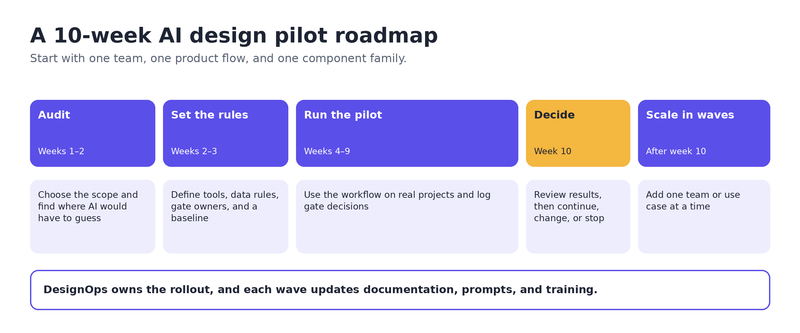
The 10-week pilot roadmap
How do you know the workflow is working?
The workflow is working when quality holds and rework falls, not when output simply rises. Compare the pilot with your baseline using a small set of measures:
Metric | How to measure it | Good sign |
|---|
First-pass gate rate | Share of work that passes each gate without revision, from your review log | Rising |
Rework time | Tracked hours from first draft to approval | Falling |
System coverage | Share of elements using approved tokens and components, from a file or code audit | Rising |
Escaped defects | Brand or accessibility issues found after Gate 4 | Falling |
System bypasses | Screens or assets created outside approved components | Falling |
Team confidence | Short survey at the start and end of the pilot | Rising |
Measure time and quality together, because speed alone can hide extra review work. Sparkbox's design system ROI study offers a simple method to borrow. Eight of its developers built the same form twice while timing themselves, and reviewers ranked each result against the design. The median build took 2 hours with a design system and 4.2 hours from scratch. It was a small study without AI, so the method is more useful here than the number.
Treat vendor claims and individual reviews the same way. A freelancer on OMR Reviews reports that
Mozaik cut a simple edited video from 2–3 hours to 20–30 minutes. That's a useful signal, but it's self-reported and may not match your team's work.
My recommendation is simple: judge your AI design system by how much good work gets through the gates, and how little has to be fixed later.
Call for guest authors
Become a guest author: Do you have real expertise in a specific field and want to share what you know? Just email us at reviews-experten@omr.com and bring your expertise to our readers. We look forward to hands-on insights straight from practice.


