Why a modern RMM does more than just monitoring and patching, and how to transform it from a reactive tool into an operating model for resilient endpoints
IT teams and service providers are managing more endpoints than ever before, with the same number of employees, increasing security requirements, and a growing attack surface. You know the result: constant reactive measures, fragmented tools, and blind spots that grow larger every day.
The threat landscape has fundamentally shifted. Enterprise-level attacks now also affect smaller organizations because AI has industrialized cybercrime. Attacks now run at machine speed, while fragmented tools and manual responses lag behind at a human pace. As soon as monitoring, patching, remote support, and security are managed via separate tools, precisely the blind spots attackers hope to exploit emerge: gaps where an overlooked alert or an unpatched device remains undetected until it's too late.
A modern RMM platform addresses this need and does more than just monitor and patch: it secures all endpoints using a unified logic, consolidates IT operations, automates routine tasks, strengthens security, and enables the shift from reactive to proactive management. And by 2026, this will only be possible on a large scale with AI that understands your environment.
This article explains what RMM does, how to differentiate it from related concepts, and how to implement it step by step.
The Most Important Points in Brief
A modern RMM combines classic monitoring with AI-powered endpoint resilience to proactively protect distributed infrastructures at machine speed.
The convergence of RMM and UEM capabilities enables seamless real-time visibility and cross-platform control of all endpoints.
The targeted use of embedded AI automates routine processes such as scripting and accelerates IT troubleshooting by up to 70 percent.
For long-term successful operation, the principle "standardize first, then adapt" applies, ideally coupled with automated drift detection.
What is RMM? Definition and functionality
Remote Monitoring and Management (RMM)is a central platform for monitoring, patching, remotely maintaining, and automating distributed endpoints. It forms the operational backbone for managed service providers (MSPs), internal IT teams, and hybrid environments.
Technically, RMM works via a lightweight agent on each device. This agent continuously sends telemetry data to a central console. From there, actions flow back: scripts, patches, alerts, and security policies, either automatically or triggered manually by you. This way, you maintain control even across hundreds of devices.
The reason this matters right now stems from the role of endpoints. They are now the primary attack surface for hackers. This makes a modern RMM platform the foundation for Endpoint Resilience. It makes every device in your environment visible, manages it, hardens it, and protects it.
RMM, UEM, PSA, MDM: How do these concepts differ?
Several terms circulate around RMM, which are easily confused. A clear distinction will help you choose:
UEM stands for Unified Endpoint Managementand extends RMM. It enforces policies across platforms, manages compliance, and administers Windows, macOS, Linux, mobile devices, and cloud workloads from a single source. Modern platforms like N-central combine RMM and UEM into a single, security-focused platform.
PSA stands for Professional Services Automation and covers ticketing, billing, and service delivery. PSA complements RMM and often runs alongside it in an integrated manner, but it does not replace it.
MDM stands for Mobile Device Managementand focuses on mobile devices. RMM and UEM, on the other hand, are device-independent and delve much deeper into maintenance, automation, and security.
Function
RMM
UEM
PSA
MDM
Monitoring and alerting
Yes
Yes
No
partially
Patch Management
Yes
Yes
No
partially
Remote Access and Remote Support
Yes
Yes
No
limited
Mobile Device Management
limited
Yes
No
Core area
Ticketing and billing
No
No
Yes
No
Safety hardening
Yes
Yes (deep)
No
limited
AI capabilities
platform-dependent
platform-dependent
No
No
💡 Tip: As soon as you need monitoring, security, automation and AI in a single platform, the path leads to a modern RMM with UEM capabilities.
Key features of a modern RMM platform
A modern RMM platform organizes its functions along the pillars of Endpoint Resilience:
1. Real-Time Visibility and Management
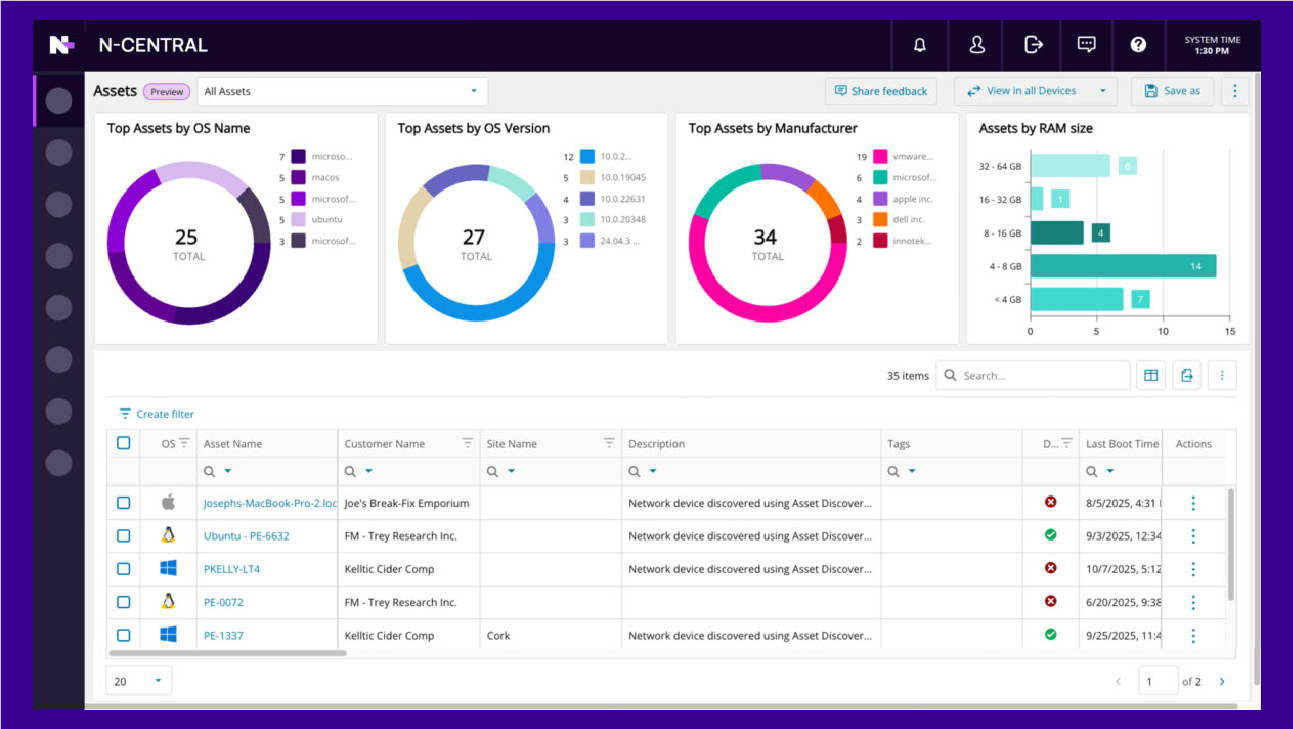
The first pillar is real-time visibility and management. This includes monitoring and alerting for health, performance, and availability, threshold-based alerts, unified dashboards, and a real-time inventory across Windows, macOS, Linux, and cloud workloads. Embedded AI takes this pillar to the next level by translating raw telemetry into prioritized, context-aware actionable insights, rather than simply displaying dashboards.
2. Endpoint Protection
The second core function is autonomous endpoint protection. This includes continuous scanning of over 900 applications on Windows, macOS, and Linux, as well as integrated patch remediation for more than 340 third-party applications and macOS and Linux operating systems – secured by test rings and rollback. Vulnerability management goes beyond CVSS severity, combining CISA KEV status of active exploitation and EPSS risk assessments with live device context. This allows technicians to identify not only vulnerabilities but also actual risks in real time. Hardening and configuration enforcement remain aligned with CIS and NIST frameworks. Shadow AI detection provides visibility into unauthorized AI tools in applications, browser extensions, IDE plugins, and AI traffic at the network layer. Open interfaces connect the security stack across EDR, XDR, MDR, backup, and SIEM.
3. IT Automation
The third pillar concerns IT automation. It automates routine tasks, deployments, and self-healing workflows using scripts. AI-powered scripting translates natural language into executable scripts, and no-code toolkits and adaptive rule sets further reduce the effort.
4. AI extensibility
The fourth core function of modern RMM systems is open AI extensibility. This combines secure remote access and support with audit logs and unattended access. Through open standards, you can connect external AI tools to your RMM's live data and build cross-platform workflows. An API-first architecture with AI-powered developer resources keeps the platform open.
5. Integrated Remote Access
Secure remote access completes the platform: Chat directly with the device without starting a full session, connect in seconds via PIN, and work in the background without disturbing the end user. Every session is fully logged – including logs and session summaries. Thanks to an integrated collection of tools with common scripts, technicians can resolve issues without having to switch between tools.
Who benefits from RMM?
Managed Service Providers (MSPs) benefit from multi-tenant management. They can scale their business without linearly increasing their workforce, utilize delegated access and white-label options, and build value-added services. AI governance and security consulting, in particular, are becoming new revenue drivers.
Internal IT teams in mid-sized companies use RMM to standardize across multiple locations, consolidate their tools, and deliver compliance evidence at the touch of a button. Even with lean teams, they operate at a level typically achieved by large departments, especially when AI is integrated directly into the platform.
Hybrid and co-managed setups use RMM as a shared platform between internal IT and external MSPs. Granular, role-based access control and clean tenant separation ensure this shared responsibility runs smoothly.
Step by step: How to implement RMM
RMM implementation is best achieved in clear steps, rather than changing everything at once.
Analyze the current state. You inventory your endpoints, record existing tools, identify gaps, and document your compliance requirements.
Define your requirements. You determine the functional scope, describe your scaling goals, plan the integration into your security stack, and assess your AI maturity.
Select a tool and start a pilot project. Up to 50 endpoints serve as your test base, ideally for 30 days. During this time, you evaluate not only monitoring and patching, but also the depth of automation, security features, and AI capabilities.
Deploy the agents and build your inventory. You proceed in phases, location by location or customer by customer, and continuous detection ensures that you don't miss any devices.
Standardize your patching and monitoring profiles. You work with templates and inheritance instead of configuring each environment individually.
Build automations for recurring tasks. These include automated patching, onboarding scripts, self-healing workflows, and AI-powered scripting.
Establish reporting and key performance indicators (KPIs). You track patch compliance, mean time to repair (MTTR), SLA fulfillment, the health of your endpoints, and the vulnerability remediation rate.
RMM Introduction
A Productive Platform in 90 Days
Phased implementation instead of a big bang: first understand, then roll out, then automate.
Day 1 to 30
Understand
Current state and endpoint inventory
Defining requirements and AI maturity
Pilot with up to 50 endpoints
Days 31 to 60
Roll Out
Distribute agents in phases
Standardize patch and monitoring profiles
Using templates and inheritance
Days 61 to 90
Automate
Building automation for routine tasks
Use AI-powered scripting
Establish reporting and KPIs
Source: OMR Reviews.
Common mistakes in RMM implementations and how to avoid them
Some mistakes are repeatedly made when implementing RMM. Here are the six most common ones:
Too Many Tools
Some teams simply place RMM alongside existing point solutions instead of consolidating. Plan for the decommissioning of outdated tools instead. A platform that combines asset management, remote access, monitoring, patching, and security eliminates this proliferation.
Lack of Standardization
Configuring each environment individually leads to a loss of overview. Use templates, inherit policies, and filter data-centrically to enforce consistency at scale.
Patching Without Test Rings
Untested patches directly impact production. Work with pilot groups, a phased rollout, and AI-powered vulnerability prioritization so you can focus on what matters most.
Alarm Fatigue
Poorly configured thresholds will overwhelm your technicians until they ignore the alerts. Adjust the thresholds iteratively and rely on AI that proactively identifies risks instead of bombarding you with notifications.
Shadow AI
AI tools are reaching endpoints faster than IT can detect them. Every RMM strategy in 2026 must consider unauthorized AI as a security and compliance risk.
Lack of Escalation Processes
Without clear runbooks and defined escalation levels, tickets remain unused, and no one feels truly responsible. Establish fixed procedures for recurring cases and determine who takes over at each stage.
Source: OMR Reviews.
Best practices for RMM operations
Implementing an RMM tool is easy. Operating it in a way that actually reduces work rather than creating new work is the real challenge. The following seven tips will help you do just that:
Standardize first, then adapt
The greatest strength of RMM is repeatability. First, define a standard that applies to 80 percent of your devices: the same patch policies, the same monitoring thresholds, the same agent configuration. Individual configurations should only be introduced once this standard is running stably.
Treat patch compliance and vulnerabilities as KPIs
Make patch compliance and vulnerability closures key performance indicators (KPIs) and report them monthly. A simple number suffices: What percentage of your devices are patched within the defined timeframe?
Build automation step by step
Opt for a gradual rollout rather than a big bang. Start by automating the tasks you perform manually most frequently, and expand from there. Each new automation should first run on a small test group before being rolled out to the entire team. This keeps each step manageable, minimizes errors, and fosters trust in the automation, preventing your colleagues from disabling it after the first broken script.
Regularly check security hardening and detect drift.
Regularly test your devices against recognized baselines like CIS or NIST, or against your own specifications. Equally important: drift detection. Configurations change in everyday use, through updates, manual interventions, and software installations. A good RMM (Remote Monitoring Module) automatically notifies you when a device deviates from its intended state, before it becomes a security vulnerability.
Clean audit trail and role-based rights
Every action in the RMM must be logged: Who did what, when, and on which device? This audit trail is your safeguard in case of incidents and audits. In addition, role-based access control (RBAC) is implemented. Not everyone needs full access. Clear roles reduce the risk of costly errors and keep your system clean.
Use embedded AI for faster diagnosis
AI has become indispensable in RMM. It diagnoses problems faster, prioritizes solutions based on urgency, and identifies risks before they escalate. Studies show IT processing speeds of up to 70 percent across common technical tasks. The goal isn't to replace people, but to eliminate routine tasks so your team has time for cases that truly require human expertise.
Remain connectable via open AI standards
AI tools are evolving at breakneck speed, and what's standard today might be obsolete in twelve months. Therefore, rely on a platform with open, standardized AI connectivity. This way, your RMM data will work with any AI tool your team uses, instead of being stuck in a closed, isolated solution.
Software tip: N-central by N-able
If you're looking for a security-focused platform that combines RMM and UEM, N-central by N-able is worth considering. The platform is designed for IT teams and MSPs who want to both defend and optimize their environments. It transforms endpoints from potential vulnerabilities into a resilient, actively protected part of your environment and streamlines operations through real-time visibility, automated hardening, intelligent workflows, and embedded AI.
N-central combines asset management, remote access, monitoring, patching, and security in a single platform. This reduces costs and complexity, freeing up IT budgets for strategic initiatives.
Embedded analytics
Power BI dashboards transform telemetry data into instantly actionable insights. Drill-down views offer direct data access and export. Templates for device inventory, patch compliance, and more minimize setup effort.
Network Device Monitoring
Monitors Cisco, Fortinet, HP, Juniper, SonicWALL, and all MIB-enabled devices. Manage via SSH and automation, with a unified view ofnetwork, user, and server endpoints for complete visibility across the entire IT environment.
Secure by design
SOC 2 Type II certified, HIPAAType 1 compliant, ISO 27001 certified and CMMC 2.0 ready – with role-based access control and fault-tolerant, AES-256 encrypted remote access.
Real-time visibility with AI insights
The embedded AI assistant (N-zo)allows technicians to query live device data in natural language. Environmental summaries provide the most important risks and discussion points before a customer meeting.
Autonomous Endpoint Protection
Automated security policies, continuous vulnerability management with risk-based prioritization (CVSS, exploitability and CISA KEV), and shadow AI detection that identifies unauthorized AI tools via endpoints and network traffic.
High-performance IT automation
Infinity Core's data-centric architecture enables precise control based on location, device class, or individual characteristics. More than 700 pre-built automation templates and a no-code drag-and-drop builder make implementation easy for all technicians. N-zo Expert Agents complement this with guided troubleshooting and AI-powered scripting.
Open AI extensibility
The MCP server connects any MCP-compatible AI tool such as Claude, ChatGPT or Copilot bidirectionally and in real time with the live data by N-central, without any custom code and without vendor lock-in.
Cross-platform
N-central covers Windows, macOS, Linux and cloud workloads and operates with a multi-tenant architecture, delegated access and tenant separation.
According to the manufacturer, companies using N-central achieve up to 70% faster IT operational performance in typical technician tasks (PX Research), 240x faster resource utilization analysis, 60x faster documentation access, and 40x faster root cause analysis and incident reporting.
Conclusion: This is how your RMM in 2026 will succeed
A well-implemented platform like N-central allows you to scale Endpoint Management without increasing your workforce, continuously strengthens your security posture, and enables you to respond to threats at machine speed.
Nils ist Senior SEO-Texter bei OMR Reviews und darüber hinaus ein echter KI-Enthusiast. Und als solcher ist er immer auf der Suche nach Anwendungsfällen und Workflows, die sich mit Hilfe von künstlicher Intelligenz (teil-)automatisieren lassen – egal, ob im Alltag oder auf der Arbeit. Nur bei einer Sache lässt er sich nicht von KI unter die Arme greifen: nämlich dann, wenn er in Ableton Live seinem liebsten Hobby nachgeht und Techno produziert.
Dieser Artikel erscheint auf OMR Reviews – der führenden DACH-Plattform für B2B-Software-Bewertungen, Software-Vergleiche, Agenturen, Business Services und B2B-Tech-Content. Mit mehr als 80.000 verifizierten Bewertungen und 12.000+ gelisteten Tools hilft OMR Reviews Unternehmen dabei, passende Software-Lösungen und Dienstleister fundiert zu recherchieren, zu vergleichen und bessere Entscheidungen zu treffen.
IT Risikomanagement ist eine unverzichtbare Lösung, die Unternehmen dabei unterstützt, ihre Daten vor allen Risiken zu schützen, die im Zusammenhang mit der Nutzung von Software und Hardware...
Netzwork Monitoring Software ermöglicht es Unternehmen, Netzwerke in Echtzeit zu überwachen, um die Verfügbarkeit und Leistung von IT-Infrastrukturen sicherzustellen. Durch den Einsatz diese...
Remote-Monitoring-Management-Software (RMM) wird für die Fernüberwachung und -verwaltung von Netzwerken und das Ressourcen-Monitoring von IT-Systemen eingesetzt. RMM-Softwares bieten einen Ü...
Endpoint Management bezieht sich auf die umfassende Überwachung und Verwaltung von Endgeräten innerhalb eines Netzwerks. Unternehmen setzen diese Lösungen ein, um die Sicherheit und Aktualit...
Patch Management Software ist ein kritisches Werkzeug in der IT-Sicherheitsstrategie von Unternehmen, das die Verwaltung und Automatisierung des Patch-Prozesses für Software und Betriebssyst...